A fictional case. Corvana Air does not exist; every name, number and interview below is invented. How Adobe Experience Platform behaves is taken from Adobe’s documentation, checked in November 2026.
Vendor rollout checklists start with “define your use cases”. In a live AEP, start with a different question: what breaks when the identity model changes?
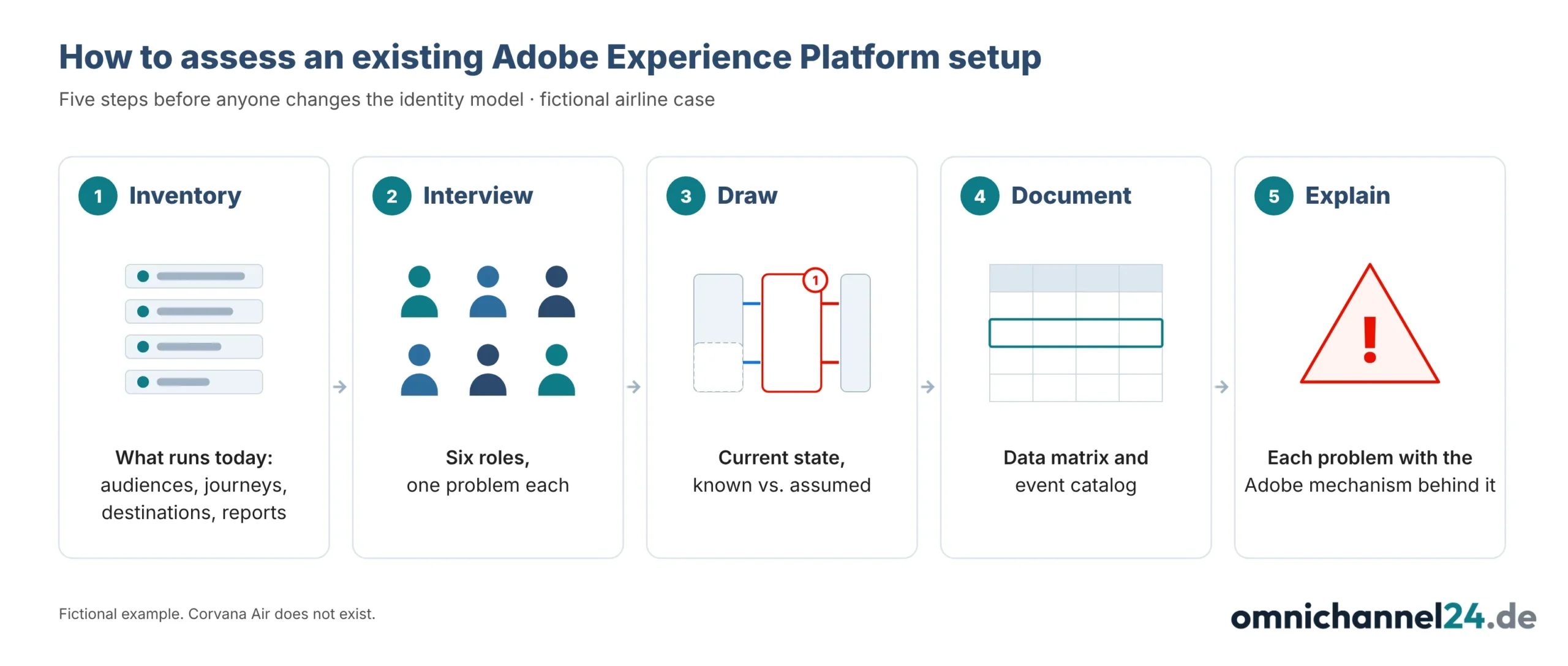
- InventoryList every audience, journey, destination and report that depends on today’s identities. That list is what you must not break.
- InterviewSix roles, one problem each. Every quote becomes a hypothesis you check in the system.
- DrawThe current-state architecture on Adobe’s reference layout. Anything you only assume is drawn dashed.
- DocumentA data matrix (dataset, identities, primary, cadence, latency, labels) and an event catalog.
- ExplainEvery problem with the Adobe mechanism behind it. Without the mechanism it is an opinion.
30 seconds to here · about 12 minutes for the full case · jump to the seven problems or what breaks first
- AccessRead access to the production sandboxes: Identities, Schemas, Datasets, Profiles, Audiences, Journeys, Destinations, Monitoring, Audits and Query Service, plus the license usage dashboard if the organisation has switched it on.
- PeopleOne hour each with CRM or loyalty, sales, the data platform team, data protection, operations and the agency that builds the journeys.
- PaperworkThe order form or the product names on the contract. Edition and package decide what the platform can do.
- OutputFive documents: inventory, interview notes, current-state diagram, data matrix with event catalog, problem list.
One message, six systems. An airline app shows a push notification: “Your gate has changed: CV412 to Lisbon now boards at C17.” Behind that one line, operations control knows the new gate, the booking system knows who is on the flight, the loyalty platform knows who that person is, the app knows their phone and whether they allowed push messages, Adobe Experience Platform joins it into one customer profile, and Journey Optimizer sends the message. If one link is missing, the message arrives late, reaches the wrong person or never arrives. Finding those missing links before anyone redesigns the setup is what an assessment is for.
Consultants rarely start on an empty platform. They arrive at an Adobe Experience Platform that has been live for two years, with audiences, journeys in Journey Optimizer, destinations and reports, all built on identities that are imperfect in ways nobody has written down. The client already knows the target: “the profile should reflect how we actually sell”. The risk sits on the way there.
This guide walks through that first phase with a fictional airline. It is the order I use before I draw a single box of a target architecture for an Adobe Experience Platform estate: inventory, interviews, current state, data matrix, problems.
The case: Corvana Air
- Company: a European network airline with one hub. Private travellers, business travellers, companies with a corporate contract, travel agencies.
- Loyalty: “Corvana Miles”, about four million members. Corporate programme with about 1,800 contracts.
- Adobe today: Real-Time CDP B2C Prime, Journey Optimizer with email, push and SMS, Customer Journey Analytics Select, Web SDK and Mobile SDK. Six market sandboxes plus one development sandbox.
The board wants three things: address corporate customers as accounts, not as a pile of individuals; tell passengers about cancellations within minutes instead of hours; and stop sending travel details to the wrong person. One condition comes with it: nothing that runs today may break.
Step 1: Inventory what runs on today’s identities
The first list in discovery is not a wish list. It is an inventory of everything that will behave differently once identity graphs change.
| Object | Count (fictional) | Depends on | Risk when identities change |
|---|---|---|---|
| Audiences | 42 | Email, Miles ID | Member counts jump when collapsed graphs split |
| Journeys | 16 | Email (entry), PNR (booking events) | Entry, re-entry and exit behave differently |
| Destinations | 6 | Hashed email, mobile ad ID | Match rates in paid media shift |
| CJA projects | 23 | Person ID = email | Time series break when the person ID changes |
| Agency workarounds | 11 | Exclusion audiences for “assistants” | Become useless, or suddenly exclude real travellers |
Check: for every journey, note the entry identity and every exclusion audience. Workarounds are the first thing a clean identity model breaks.
Step 2: Interview six roles, one problem each
Each interview produces a need, an observed problem and a hypothesis you can verify in the system. The quotes are fictional, the pattern is not.
| Role | What they said | Hypothesis to verify |
|---|---|---|
| Head of loyalty and CRM | “The assistant of our best corporate customer gets more upgrade offers than her boss.” | The booker’s email is sent as an identity and links travellers (P1) |
| Head of corporate sales | “I have 1,800 contracts, but in Adobe I only see individuals.” | No account level in the model or the licence (P3) |
| Data platform lead | “The PNR was the only key in the booking feed, so we marked it as an identity.” | Booking codes link people; market sandboxes split the same person (P2, P6) |
| Data protection officer | “A booker saw a traveller’s wheelchair request in a marketing email.” | Missing labels plus collapsed graphs (P7, P1) |
| Head of operations control | “For a cancellation, the call center phones people. It takes hours.” | Flight status is not in AEP; bookings arrive overnight (P5) |
| Agency | “Every new journey copies the same exclusion workaround.” | The redesign breaks exactly these workarounds (P1) |
Why one problem per role: a stakeholder who names five problems names none clearly. Ask for the one that cost them the most last quarter, then ask where you can see it in the data.
Between interviews and drawing: check every hypothesis in the AEP interface
Interviews tell you where people feel the pain. The Experience Platform interface tells you where the data actually stops. Before anything goes on a diagram, I open these places in the production sandbox, read-only:
| Where in AEP | What you see | What it answers |
|---|---|---|
| Monitoring (Data Management) | One dashboard from the data lake to activation, with cards for Data lake, Identities, Profiles, Audiences and Destinations. Last 24 hours by default, up to 30 days or a custom range. | Where data stops on its way to a message |
| Dataflow run details (Monitoring › Data lake › source › dataflow › run) | Records received, ingested and failed, an error summary with code and description, error diagnostics to preview and download | Which rows fail and why. Diagnostics exist only if they were switched on when the source connection was created, and are kept for up to 30 days. Streaming sources such as the HTTP API are not on this dashboard. |
| Monitoring › Profiles | Per dataflow: records received and failed, profile fragments created and updated | Whether “batch succeeded” also means “profile updated”. Often it does not. |
| Datasets (dataset activity) | Ingestion rate, successful and failed batches, a preview of up to 100 rows, the Profile toggle, the partial ingestion threshold (5 % by default) and the retention of experience event datasets | Which datasets feed Profile, how many bad rows a batch may carry before it fails, how long events are kept. Data ingested before a dataset was enabled for Profile is not added afterwards. |
| Schemas (identity fields) | The Identity and Primary identity checkboxes with the namespace of each field; one primary identity per schema | Where the PNR and the booker’s email became identities. In a Profile-enabled schema that holds data, the primary identity cannot be changed. |
| Profiles › Browse | One merged profile by namespace and value: attributes, the 100 most recent events, audience memberships | What the assistant’s profile really contains (P1) |
| Monitoring › Destinations | Per run: identities activated, excluded (missing attributes or consent) and failed | Whether consent and labels block what they should (P7) |
| Audits | Who changed schemas, datasets, namespaces, merge policies, audiences, destinations and dataflows, and when; kept for 365 days | Who built today’s identity model. Adobe’s list of audited resources does not name the identity settings. |
| Experience Platform Debugger and Assurance | Edge Trace in the Debugger opens an Assurance session; the request shows the XDM payload that left the browser | What the website really sends: which identities, on which events (P4) |
| License usage dashboard | Licensed, measured and predicted usage per metric and per sandbox, daily snapshot; needs its own permission and is off by default | How close the limits are before the profile count moves |
Check: follow one nightly booking batch from the dataset to the audience: dataset activity, then Monitoring › Data lake, Identities and Profiles. The stage where the count drops is where the problem lives. At Corvana, every batch showed success in the dataset, error diagnostics had never been switched on for the booking source, and nobody had looked at the Profile stage.
Step 3: Draw the current state, and mark what you only assume
I draw the current state on Adobe’s reference layout: sources on the left, the Edge Network and the platform hub in the middle, activation and analytics on the right. Three conventions make the drawing useful in a workshop:
- Dashed boxes are assumptions. The travel agency feed and the data warehouse were described in interviews but not yet seen. Each dashed box is an open question.
- Numbered markers are problems. They point to the same P1 to P7 as the problem list, so the drawing and the table tell one story.
- Arrows show direction and cadence. Ingress in blue, egress in red, intra-platform dashed. A nightly file is drawn differently from a stream, because it behaves differently.
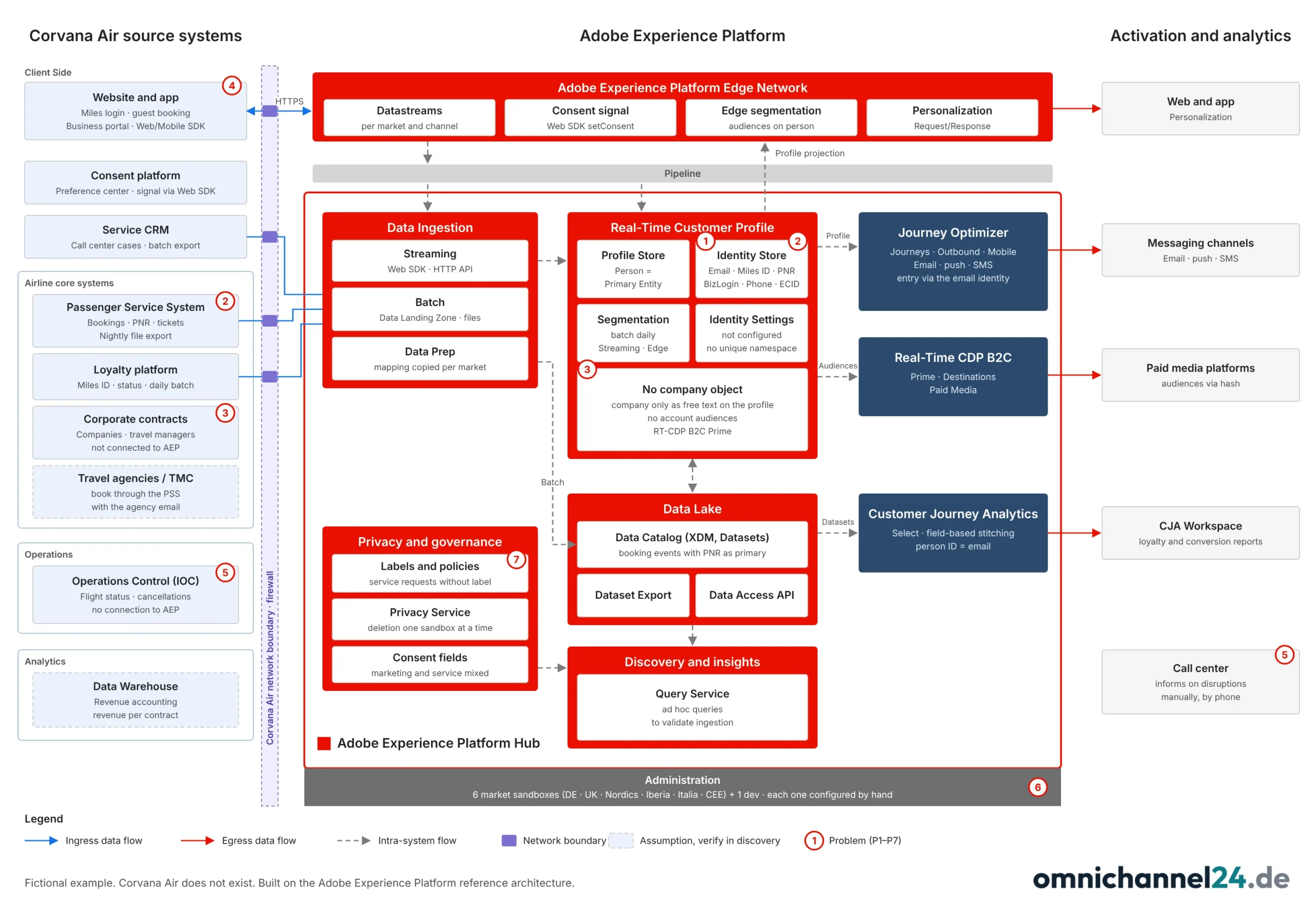
Two things stand out before any data is opened. Operations control has no connection to AEP at all, so the cancellation problem cannot be solved inside the platform as it is. And the company only exists as free text on the profile, because the B2C edition has no account object.
Step 4: Build the data matrix and the event catalog
The data matrix is the central document of the assessment. One row per data object: source, XDM class, identities, primary identity, cadence, time until usable, labels, the problem it carries and what must change.
| Data object | XDM class | Identities today | Primary | Cadence | Problem | Target |
|---|---|---|---|---|---|---|
| Web and app interactions | ExperienceEvent | ECID, email, Miles ID, business login | ECID | Streaming | P4 | One person identifier per event |
| Miles members | Individual Profile | Miles ID, email, phone | Miles ID | Daily batch | – | Labels on contact fields |
| Bookings | ExperienceEvent (Flight Reservation) | PNR, booker email, several Miles IDs | PNR | Nightly file | P1, P2 | One event per passenger, streamed |
| Corporate contracts | not connected | – | – | – | P3 | Business account with its own source key |
| Consents | Individual Profile | ECID, email | ECID | Streaming and batch | P7 | Marketing per channel, service separate |
| Flight disruptions | not connected | – | – | – | P5 | One streamed event per passenger |
Next to it sits the event catalog: every event that arrives through Web SDK, Mobile SDK or the HTTP API, with its eventType, the identities in its identityMap, the consent it needs and what it triggers. A few rows from the Corvana catalog:
| Event | eventType | Arrives via | Triggers |
|---|---|---|---|
| Booking started | commerce.checkouts | Web SDK | Abandonment journey |
| Booking completed | commerce.purchases | Web SDK | Pre-trip journey, one per booking |
| Flight cancelled, per passenger | corvana.ops.flightCancelled (custom) | HTTP API, streaming | Disruption journey |
| Strike at the hub | corvana.ops.hubDisruption (custom) | HTTP API, business event | Read audience of affected travellers |
Why the catalog matters for the cancellation problem: only events streamed into the platform can trigger a journey. Batch-ingested events, Query Service inserts and internal Journey Optimizer datasets cannot. Corvana’s nightly booking file will never trigger a disruption message, however well it is modelled.
Step 5: Explain each problem with the Adobe mechanism behind it
| No. | What happens | Adobe mechanism |
|---|---|---|
| P1 | Agencies and assistants book with their own email. The email is an identity and links every traveller into one profile. | Identity Service links records that share an identity value. Marking the Miles ID as unique splits the graph, but the algorithm keeps the newest link, so the booker’s email ends up on the last traveller. |
| P2 | The PNR is a person-type namespace and the primary identity of booking events. One PNR holds several passengers and is reused later. | The identity type “non-people identifier” creates no identity graph. A graph holds at most 50 identities; beyond that, Identity Service deletes the oldest cookie IDs first, then device IDs, then the other types. |
| P3 | Corporate contracts are not connected. Sales cannot build account audiences. | Account profiles are licensed in the B2B and B2P editions of Real-Time CDP. The B2C product description does not include them. |
| P4 | Two managers log in to the business portal on their assistant’s PC, then the assistant logs in privately. One ECID links all three. | On shared devices the ECID follows the last authenticated user. If a known profile lacks the highest-priority person namespace, a graph can link different people through one ECID. |
| P5 | Cancellations are phoned out by the call center. | Event-triggered journeys can take up to five minutes to the first action; batch events cannot trigger them at all. |
| P6 | Six market sandboxes. Someone who books in two markets exists twice. | Identity settings, graphs and consent data live per sandbox. Privacy deletion requests are the exception: Experience Platform processes them across all sandboxes of the organisation. |
| P7 | Service and marketing consent share one field. Special service requests carry no data usage label. | Journey Optimizer treats an empty consent field as consent. Labels and policies decide what may reach a marketing activation. |
The discovery checklist: seven vendor questions, turned around
Vendor rollout worksheets, such as Salesforce’s Data 360 rollout checklist, ask seven questions: stakeholders, use cases, concepts, architecture, data sources, profile rules and KPIs. They are written for an empty platform. For a live AEP, I keep the seven areas and change every question:
| Area | Rollout question (new platform) | Assessment question (live AEP) | Where to look |
|---|---|---|---|
| Stakeholders | Who needs to be involved? | Who owns each journey, audience and dataset today, and who signs off a change? | Journey and audience owners, roles and permissions |
| Use cases | Which use cases do we want? | What runs today and must not break? | Audiences, journeys, destinations, CJA projects |
| Concepts and licence | Which features, limits and billing apply? | Which edition and package are licensed, and which limits are already close? | Order form, Adobe product descriptions |
| Architecture | Do we need a sandbox? | Why are there this many sandboxes, and which one becomes the reference for the rebuild? | Sandboxes, sandbox tooling packages |
| Data sources | Which sources, which unique identifier? | Which dataset sends which identity as primary, at what cadence, with which labels? | Schemas, datasets, Monitoring › Identities |
| Profile rules | Which rules unify profiles? | Which namespaces are unique, in which priority, and which merge policies are active? | Identity settings, identity graph viewer, merge policies |
| KPIs | Which KPIs show ROI? | What is the baseline before the change: graph sizes, audience counts, match rates, latency? | Identity dashboard, audience sizes, destination reports |
Two questions the worksheet has and assessments forget: where the data must reside, and which data counts as sensitive. For an airline, special service requests such as wheelchair assistance belong in that second answer.
What breaks the moment the identity settings change
- Rejected eventsToday’s booking file carries two Miles IDs in one event. Once the Miles ID has the highest namespace priority, Real-Time Customer Profile rejects events that contain two or more identities of that namespace. The export has to change first.
- Old graphs stay collapsedGraphs that collapsed before the settings were saved are only corrected when new data updates them. Adobe’s implementation guide assumes a new sandbox without data.
- Counts moveWhen graphs split, one profile becomes four. Audience sizes, licensed profile counts and CJA time series all move. Tell finance and the report owners before, not after.
What each role should take away
CMOs and heads of CRM. The target (“profiles that reflect how we sell”) is rarely the hard part. The inventory of what runs today is, and it is the document that keeps a redesign from becoming an outage.
Data protection officers. Collapsed graphs are a privacy issue, not only a data quality issue. A booker who receives a traveller’s details is the visible symptom of an identity rule nobody wrote down.
Architects. Never present a problem without the platform mechanism behind it, and never draw an assumption as a fact. The dashed box is the most honest element on the page.
Questions people ask about AEP assessments
What is a current-state assessment in Adobe Experience Platform?
A structured review of an existing AEP setup before it is redesigned: what runs today, which identities it depends on, how data arrives, and which problems the platform’s own rules explain. Its output is an inventory, a current-state diagram, a data matrix and a problem list.
Can batch data trigger a journey in Adobe Journey Optimizer?
No. Only events streamed into the platform can trigger journeys. Batch data can still change profile attributes and batch audiences, which Journey Optimizer reads at the next audience evaluation.
Should a booking reference be an identity namespace?
Not as a person identity. A booking reference describes a booking, not a person, and can hold several passengers. Keep it as a field on the event and, if journeys must run per booking, use it as a supplemental identifier in Journey Optimizer.
The Corvana Air series continues with how to find, simulate and fix a collapsed identity graph, how to choose the Real-Time CDP edition and how to draw an AEP architecture diagram. Related: identity resolution in Salesforce Data 360, the same problem on a different platform.
Fictional case: Corvana Air, its systems, numbers and interviews are invented for learning purposes. Adobe, Adobe Experience Platform, Real-Time CDP, Journey Optimizer and Customer Journey Analytics are trademarks of Adobe Inc. This is an independent analysis; no partnership with or endorsement by Adobe.
Sources
- Adobe Experience League — Identity Optimization Algorithm
- Adobe Experience League — Troubleshooting guide for Identity Graph Linking Rules
- Adobe Experience League — Implementation guide for Identity Graph Linking Rules
- Adobe Experience League — Identity namespace overview
- Adobe Experience League — Guardrails for Identity Service data
- Adobe Experience League — Work with journey events
- Adobe Experience League — Journey Optimizer guardrails and limitations
- Adobe Experience League — Use supplemental identifiers in journeys
- Adobe Experience League — Manage opt-out consent
- Adobe Experience League — Flight Reservation schema field group
- Adobe — Product Description Real-Time CDP B2C Edition
- Adobe — Product Description Real-Time CDP B2P Edition
- Adobe Experience League — Identity Graph Linking Rules overview
- Adobe Experience League — Monitor dataflows (Monitoring dashboard)
- Adobe Experience League — Monitor data lake ingestion
- Adobe Experience League — Monitor Profile data
- Adobe Experience League — Monitor destination dataflows
- Adobe Experience League — Datasets UI guide
- Adobe Experience League — Partial batch ingestion
- Adobe Experience League — Define identity fields in the UI
- Adobe Experience League — Real-Time Customer Profile UI guide
- Adobe Experience League — Audit logs overview
- Adobe Experience League — Validate Web SDK implementations with Assurance
- Adobe Experience League — License usage dashboard
- Adobe Experience League — Privacy request processing in Real-Time Customer Profile